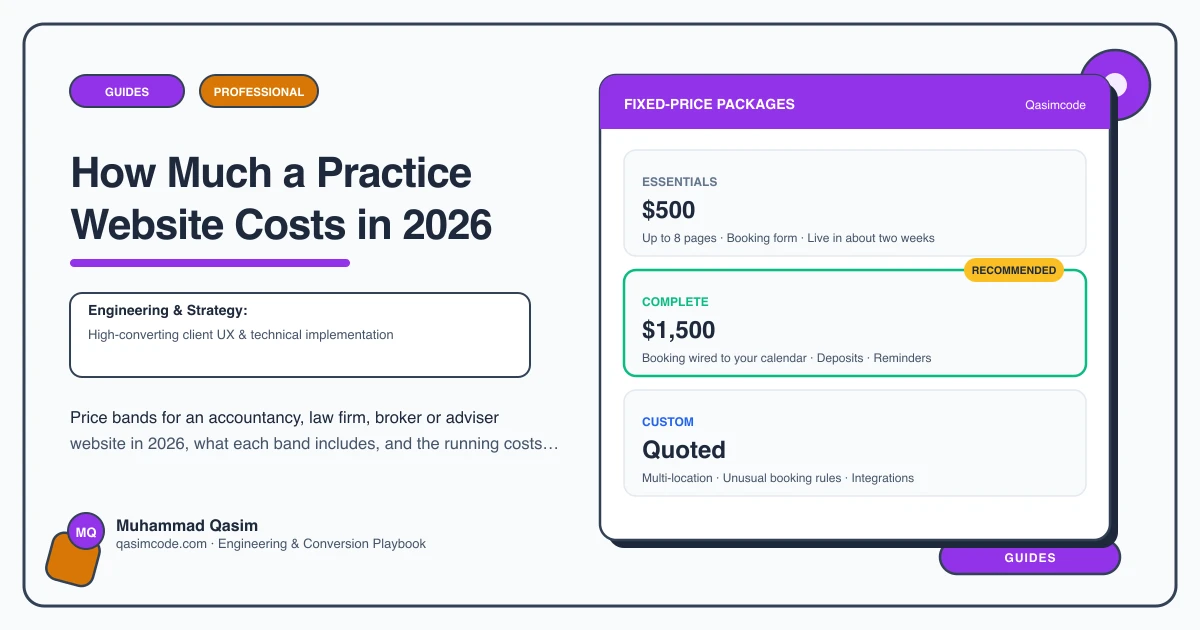
The range
A practice website costs from nothing to tens of thousands, and the spread comes down to one question: can a client understand what you do, see what it costs, check that you are properly regulated, and book the first meeting without phoning. Here are the bands.
The free option, and what it costs you
Your professional body's find-a-member directory, an unbundled comparison site, a Google Business Profile, a LinkedIn page.
You get: a listing, and sometimes enquiries.
You do not get: your own domain ranking for "accountant [town]" or "conveyancing solicitor [city]", service pages in your words, a fee page, a place to put your regulator registration and required disclosures, team profiles, or a booked consultation. On lead sites you also get a client who is comparing you with four other firms on price alone.
Right for: a sole practitioner in the first months, or a firm entirely fed by referral.
A template site
A professional services theme on Squarespace, Wix or WordPress with your logo, an About page, a services list and a contact form.
You get: a presentable site with your name on it.
Usually missing: a page per service in the client's words rather than a bullet list; fees or the quoting process stated; regulator details and disclosures placed where your body expects them; team profiles with qualifications and a booking button each; consultation booking with an intake form; a client portal link; speed on a phone; hosting in your name.
Right for: a firm whose diary is full and wants a business card online.
What we build: Essentials at $500, Complete at $1,500
Built around how a client chooses a professional: a page per service in plain words, each one able to rank on its own; fees stated where you can and the quoting process explained where you cannot; regulator registration and disclosures placed correctly and easy to keep current; team profiles with credentials, specialisms and a booking button each; consultation booking with an intake form through Calendly, Acuity, Microsoft Bookings, Clio Grow, Karbon or Intelliflo; client portal links where you use one; an insights section; fast on a phone; tracking on every enquiry route; everything in your name.
You get: a site that ranks for the work you want, answers the questions that currently arrive by phone, and puts a qualified first meeting in the diary.
Not usually included: photography, compliance review by your own compliance officer, the booking or practice software subscription.
Right for: law firms, accountants, mortgage brokers, financial advisers, estate agents, consultants and most independent practices.
When it goes past that: Custom, quoted after a call — multi-office firms and specialist builds
Firms with several offices and separate practice groups. Estate agents with a live listings feed from Reapit, Alto or Street.co.uk, plans, tours and valuation booking. Immigration consultants and translators with multilingual pages and correct hreflang. Advisers with calculators that need approved wording. Deep integration with a practice management system.
After launch
- Hosting: managed WordPress at $20 to $50 a month, or often free on a framework host, in your name.
- Domain: small, annual.
- Booking or practice software: whatever you pay now. Calendly and Acuity are modest per-user subscriptions; Clio Grow, Karbon and Intelliflo are practice tools with their own pricing.
- Maintenance: a care plan from $99/mo, covering updates and the booking embed when the vendor changes it.
- Content: an hour a month keeping fees, team and disclosures current. This is the item most firms skip, and stale disclosures are the one that matters.
Where the money goes
- A page per service in the client's language, with what happens, roughly what it costs and how to start.
- A fees page that either states prices or explains exactly how you quote.
- Regulatory information in one maintained place and in the footer, built so a non-technical person can update it.
- Team profiles with qualifications, professional body and a booking button each.
- Consultation booking with intake, so the first meeting starts with facts rather than a blank page.
- Speed and structure, because the client is on a phone and Google reads the service pages one at a time.
- Tracking of calls, forms and bookings by page.
- Ownership of the domain, hosting and content, with a recorded walkthrough.
Judging a quote
Ask: is there a page per service or one Services page; are fees stated or is there a quoting explanation; where do the regulator details sit and who can edit them; is consultation booking embedded or is it a contact form; can a partner edit a team profile; what is tracked; whose name is the hosting in.
Where this sits
Our builds are built to that standard at a fixed price, and the scope is set out on the professional services website page. If your current site is a template or a booking-platform page, the number worth working out is how many first enquiries last year ended in a phone call that never became a meeting, because that is the budget the site should have come from.